AI BUILD LABOrientation · Cohort 1Wednesday, September 16, 2026 · 11:00 AM ET
Four weeks inside a working agent org.

Agent Workforce.
Orientation.

Where we've come from, what you walk out with, how the four weeks run, and everything you need done before Monday.
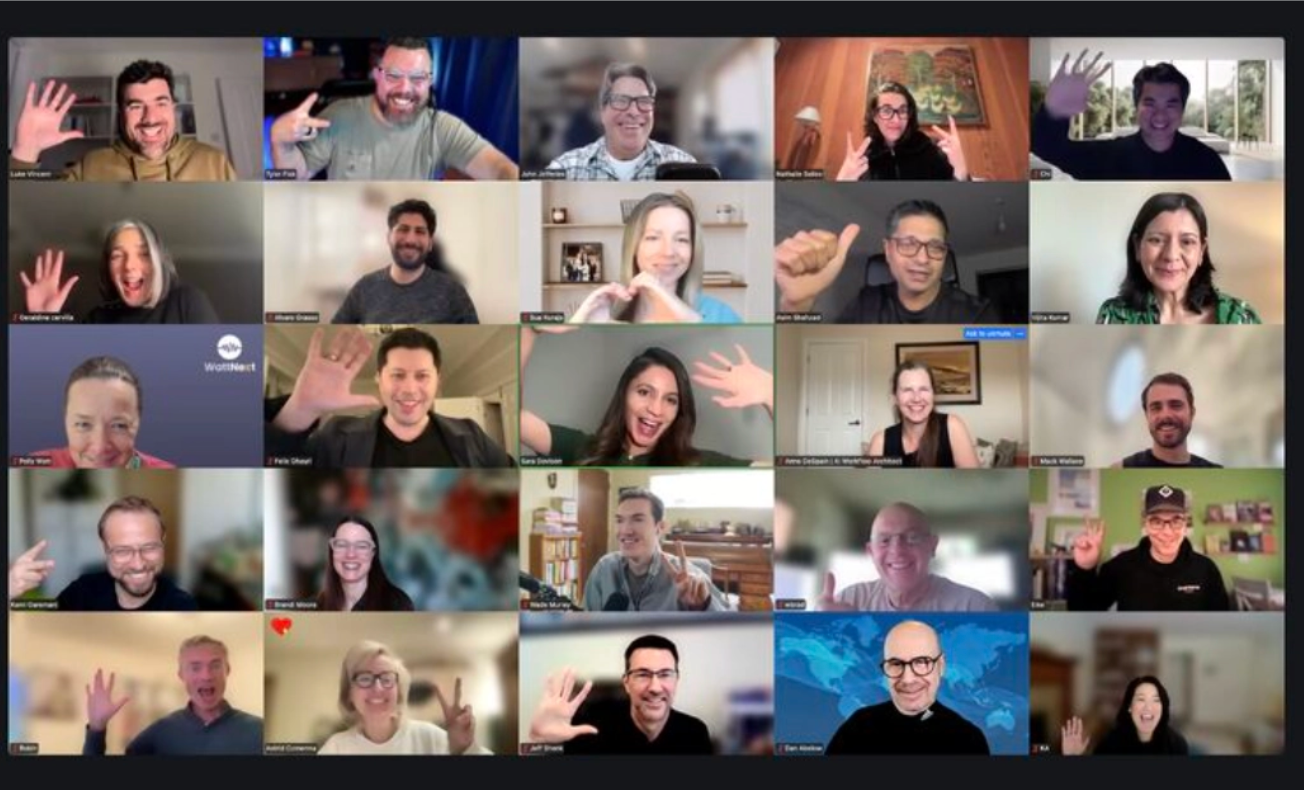
Sara Davison + Tyler Fisk · Hunter · Wade · Michael · Week 1 starts Monday, September 21
The community waving on a live call
the most unhinged Zoom chat in AIsince 2024
/|  The open01
/|The era of agent workforcesWhy now

Everyone has agents. Almost nobody is directing them.

Adoption is done
96%of organizations already run AI agents in some capacity
45%of leaders are expanding capacity with digital labor in the next 12 to 18 months
41 / 36%expect their teams to be training / managing agents within five years
The gap
12%could hand you a list of the agents they have
16%of AI users direct agents across multi-step work. They're the ones producing work they couldn't a year ago
87%of agent teams fail in the wild, at the high end. Top causes: a bad brief, agents not lining up, nobody checking

Sources: OutSystems State of AI Development 2026 (1,900 IT leaders) · Microsoft Work Trend Index 2026 (20,000 workers) · UC Berkeley, "Why Do Multi-Agent LLM Systems Fail?", NeurIPS 2025 (1,600+ traces)

/|  The era02
/|The deltaWhat organizations need · what we teach · how it gets applied

The skill organizations need isn't using AI. It's directing it. Here's where each piece lives.

Why agent teams failThe skill that fixes itThe mechanism in your orgWeek
44% a bad briefvague goal, no stop ruleDelegation · Department designA Chief of Staff that turns one line into a job. A charter that says what done looks like.1, 3
32% agents not lining upno routing, no handoffsOrchestration · Context engineeringReporting lines, routing and handoffs written into files. Knowledge the org can check.1, 2
24% nobody checkingerrors amplify 17x without a lead, 4x with oneGovernance · EvaluationA gate before anything ships. Receipts for every run. Evals that score the work.1, 4
Only 16% can direct multi-step workthe seat almost nobody hasThe methodAgent design in plain English, and the practice of adding the next department yourself.3, all

Every one of those mechanisms is a plain-English file you'll write. That's the whole trick: the skill isn't in your head, it's in the org.

/|  The delta03
/|Here's where we're headed

Ninety minutes. Five beats. Stay for the checklist.

01Who we are, and the org you inherit
02The end, first: what you walk out with, live
03The four weeks, and the skills that stack
04What you need to get started
05Between now and Monday, then Q&A

Sitting in to decide? Welcome. Everything here is what enrolled students get. There's one card for you near the end.

/|  Agenda04
/|House rules

Four rules. The fourth is the fun one.

01Questions in the chat, any time.We read it live. It's the best part of every session.
02The mic opens at Q&A.Raise your hand, we'll call you, then unmute.
03Don't be a jerk.Have the courage to be kind.
04Something will break, live.It's tradition. That's how you know it's not a video.
/|  House rules05
/|Part 01
01

Who we are, and how we got here.

Practitioners first. From chatbots to agent workforces. Why this course is an apprenticeship.
/|  Part 0106
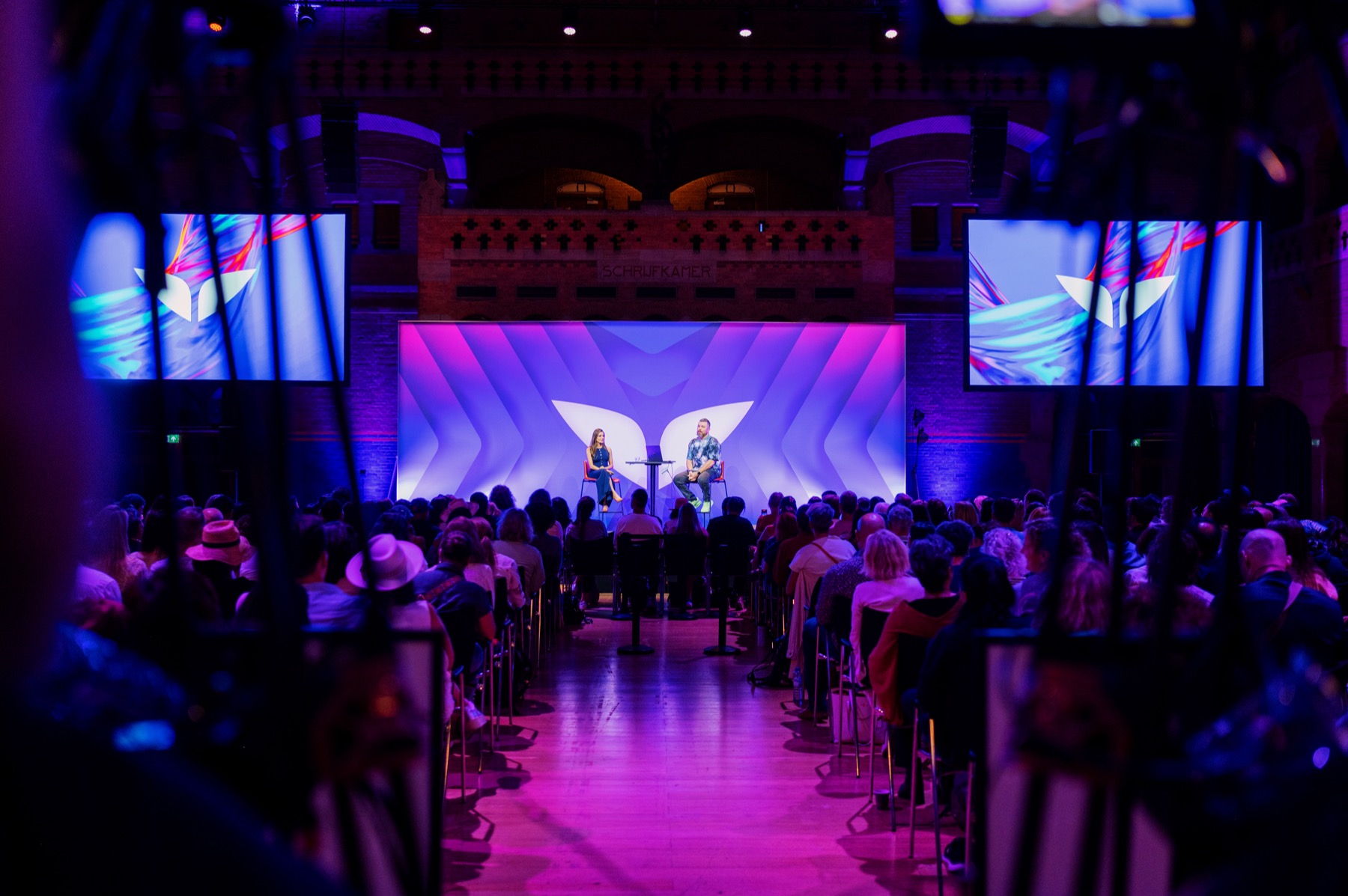
AI Build Lab speaking to a live audience
/|AI Build Lab

We build systems like this, run them, and teach what we learn.

Our students are not developers. They're professionals, consultants, and founders. Everything we teach, we run on our own business first. The org you inherit on Monday is a distilled version of the one we built and run ourselves at AI Build Lab.


Sara Davison Tyler Fisk Practitioners first
2,500+ grads · 20+ cohorts · 15+ countries
/|  Who we are07
/|Your faculty

Five humans, all four weeks. Plus the org.

SaraCurriculum, growth, your emails
TylerSystems, agents, the architecture
HunterThe build, the course, the demo
WadeYour home base, Essentials, delivery

MichaelInfrastructure, repos, the installer
/|  Who we are08
/|2023 to 2026How we got here

Every era changed what AI could do. The last one changed who's in charge.

2023Chatbots

One person, one prompt, one answer at a time.

2024Single agents

AI does a task instead of answering a question.

2025Multi-agent workflows

Agents hand work to each other. A boss agent runs a small team inside one workflow.

2026Agent organizations

Departments. Hierarchies. Directed by a person. Companies now hire for this.

/|  The market09
/|The momentWhat you say to AI changed
"Give me an answer." 2023 · CHAT
"Do this task for me." 2024 · AGENTS
"Handle this project." 2025 · WORKFLOWS
"Run this part of my business." 2026 · ORGS
"Handle it. Come back with what needs my yes."
/|  The moment10
/|And then it happened to us

We taught workflows because we ran workflows. Then the thing we were running grew.

Foundations · 2025Agentic workflows

One workflow, pointed at one job. You build it, it runs. That's what most of you learned with us.

Early 2026Workflows became departments

Workflows started handing work to each other. A lead. Specialists. A check before anything shipped.

Summer 2026Departments got a Chief of Staff

One seat we talk to. It routes, queues, escalates. We stopped being the switchboard.

NowAn agent-native company

Five people directing an org of agents that runs AI Build Lab day to day. Same rule as always: we learned it, so we bring it back to you.

Sara and Tyler
we teach what we run2026
/|  How we got here11
/|The apprenticeshipAgent Workforce · four weeks · no code

This isn't a course about agents. It's an apprenticeship inside a working agent org.

You don't start from a blank page. You walk into an organization that already runs, take it apart, make it yours, then build one department of your own from scratch, so the method is yours forever.
Day 1Inherit our wired org
Weeks 1 to 2Study it. Customise it.
Week 3Build one department yourself
Week 4Prove it with evals
ForeverRun it, or install it for clients
/|  The apprenticeship12
/|Day 1

The org you inherit. Then you make it yours.

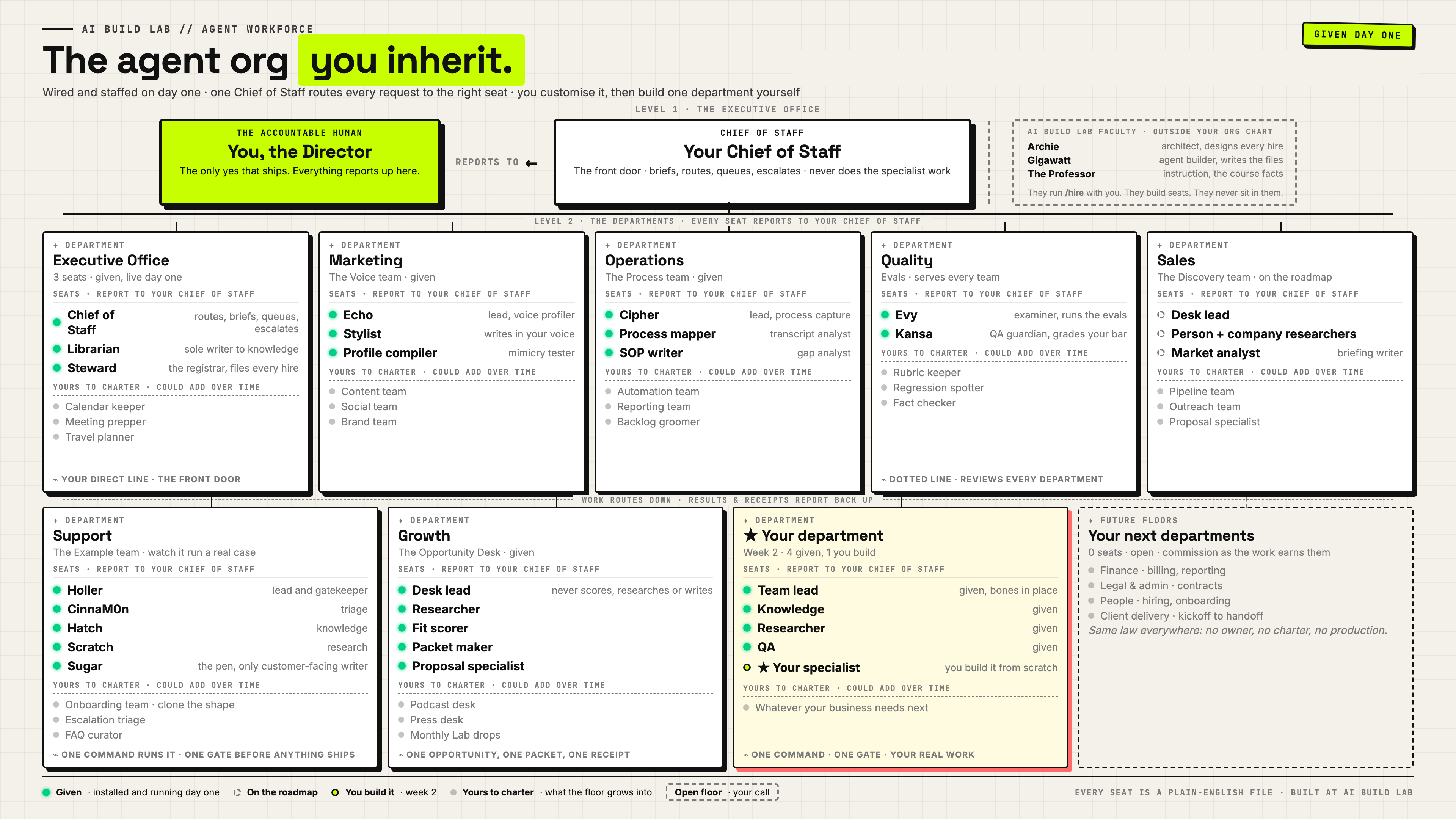
The agent org you inherit
01A distilled version of the org we run is copied into your workbench.Departments mapped, seats filled, a Chief of Staff routing.
02Every seat is a file you can open.No black boxes.
03One floor is empty on purpose.That's where your department goes in week 3.
/|  The org you inherit13
/|Is this technical?What an agent org is actually made ofIn Workforce · week 1

Files do the thinking. A harness does the work. You sit in one seat.

You
the Director One person. One seat. Two ways in. build in the harness direct from the surface
Dashboard
The dashboard. Where you see the org running, read the receipts, and operate what needs you.
Harness
Claude Code or Codex. The engine that reads the files and does the work. You never open it to run the org.
The orgPlain English.
Nothing in here is code.
/ your-company  ·  a folder
charter.mdthe law
chief-of-staff.mdthe seat
agents/job descriptions
skills/procedures
commands/the buttons
settings.jsonthe locks
knowledge/your context
receipts/the proof
Tools
Email, calendar, the web, your files. Only what you grant.
Machine
Your laptop in the course. An always-on server later.
The only layer that is yours

Swap the harness or the model. The files stay.

Every other layer is rented. The folder is the org, and it outlives any model.

What you would actually be doing

Editing job descriptions, not writing software.

If you can write a job description and a house rule, you can read every part of this org.

/|  A folder, not a codebase14
/|Part 02
02

The end, first.

What you walk out with, shown working, before we explain a single week.

/|  Part 0215
/|What you walk out withAgent Workforce · four weeks

A complete agent organization. Yours to run or sell.

01A distilled version of our org, installed day 1, made yours.Departments mapped, seats filled, a Chief of Staff routing by your rules.
02A Chief of Staff in your voice.One seat you talk to. It holds what needs your yes.
03One department built end to end, on your work.Charter, lead, specialists, a gate before anything ships.
04Proof it works.Eval scores, receipts, results. Not a demo that worked once.
05The method.The part that outlasts the four weeks: you can keep adding departments on your own.
06Yours forever.Run it for your business, or install it for clients. Models change. Your org stays.
/|  What you walk out with16
/|Before the demoHunter drives · about ten minutes

Here is what you are about to see.

01A finished build, in the dashboard you get.The shape you leave with at week 4, and how each week gets you there.
02One request goes in.A Chief of Staff routes it to a department. You watch it move through the dashboard.
03Work comes back and stops at a gate.Until a human says yes. Watch for that moment. It's the whole course.
04Every step leaves a receipt.You can open every one of them.
/|  Before the demo17
/|Live · right now
DEMO
TIME.

Hunter's screen. Team HQ. One job, start to finish.
Live means live. If it breaks, you're watching the real thing.

/|  The demo18
/|What you just sawFrom your one line to your one yes

One command in. Routed, worked, checked, held, reported. One yes out.

1 · COMMAND 2 · ROUTE 3 · ASSIGN 4 · WORK 5 · CHECK 6 · REPAIR · ONE FIX, THEN CHECK AGAIN 7 · HOLD WHAT NEEDS YOU · 8 · REPORT: DECISION, WORK, PROOF 9 · YOUR YES YOU One line "Handle it." CHIEF OF STAFF Reads the door signs Decides who owns it DEPARTMENT LEAD Plans the job Splits it across the team SPECIALISTS Do the work Only what they need QA Checks your bar Pass, or one repair CHIEF OF STAFF Holds and reports Decision · work · proof
Routing and commandChecked work and reportingRepair loop
/|  How work moves19
/|Part 03
03

Four weeks. Skills that stack.

Every week ends with something that works, and a skill you keep.

/|  Part 0320
/|The learning journey

Four weeks. Skills that stack.

GRADUATE · a complete agent org, yours to run or sell
Week 4Your judgment
Week 3Your department
Week 2Your context
Week 1Your organization

Where it landsOur org customized to your business, one department you built and proved, and the method to build every next one.

04Prove it works

SkillsEvaluation at agent and outcome level, the improve-and-rerun loop, governance at scale, reusing the method.
ProjectA proof pack and a reusable department kit.

03Design and staff a department

SkillsDepartment design, agent design in plain English, handoffs, the gate before anything ships.
ProjectA department of your own, end to end, running one job.

02Make it work your way

SkillsContext engineering, knowledge the org can check, customizing a supplied role in your voice, tracing any answer to its source.
ProjectYour customized org running a job on your facts.

01From user to Director

SkillsHow the org is wired, delegating to a Chief of Staff, reporting lines and routing, setting the rules and gates.
ProjectYour Chief of Staff set up, your org briefed, first job routed.

/|  Skill stack21
/|The four weeksWhat you do · what you have at the end of each

Your organization. Your context. Your department. Your judgment.

Week 1 · Sept 21Your organization
You doMeet the org. Tell it about your work. Set up your Chief of Staff. Set the rules.
You haveAn org that understands your goals and a clear place to begin.
Week 2 · Sept 28Your context
You doGive it facts it can check. Customize how a supplied role works. Try the customized org.
You haveYour information as knowledge the org actually uses.
Week 3 · Oct 5Your department
You doChoose useful work. Charter and staff a department. Put it to work.
You haveA department of your own, running one job on your business.
Week 4 · Oct 12Your judgment
You doDecide what good looks like. Test one improvement. Reuse the method on new work.
You haveProof it works, and a kit you can reuse. Yes, there are evals. Not in Notion.
/|  The four weeks22
/|The methodFor you · for clients · the same method

Build it for yourself. Learn to install it for others.

The method is the part that outlasts the four weeks: you can keep adding departments on your own. And every week, alongside the build, we give you the tools and the scaffolding for how you'd implement that same step for another business.

For your businessAn org running your work, a department you built, and the method to add the next one.
For other businessesA standard shape you can install for anyone. Same method, same files, no server. Run it, or sell it.
Boss level · all four weeksThe method

Keep adding departments on your own. Install the same shape for other businesses. The skill that makes every other skill reusable.

/|  The method23
/|Part 04
04

What do I need to get started?

Essentials, the installer, the workbench it builds, your stack, your weekly rhythm, and The Lab.
/|  Part 0424
/|Onboarding walkthroughWade drives · eight lessons · free for everyone

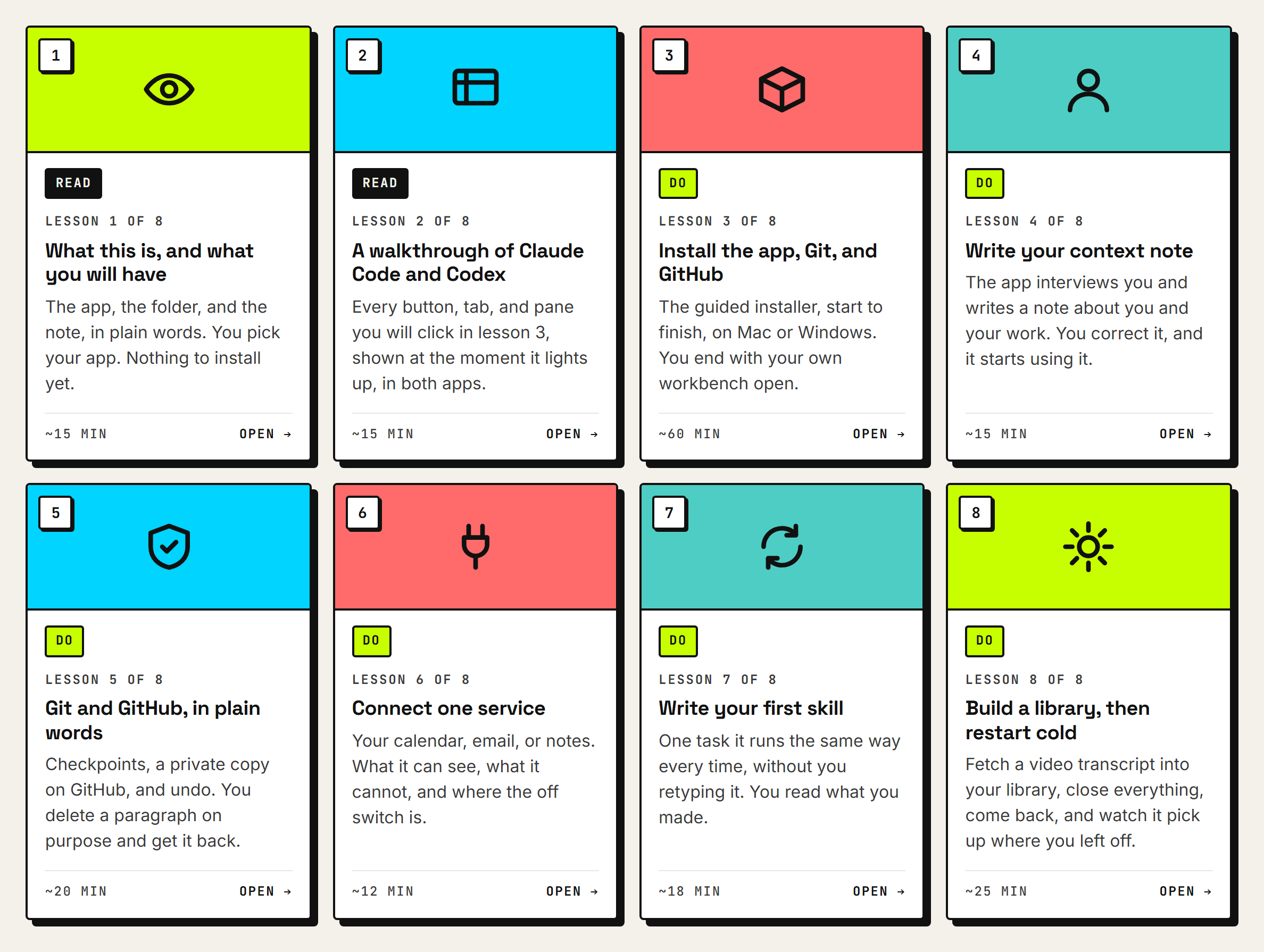
Agent Native Essentials. Wade walks it, live.

The eight Essentials lesson cards on learn.aibuildlab.com: what this is, a walkthrough of both apps, install the app Git and GitHub, write your context note, Git and GitHub in plain words, connect one service, write your first skill, build a library then restart cold
What you leave Essentials with

A private workbench, a copy online, and proof it picks up where you left off.

An app on your own computer, working in a folder that is yours. A note about you it reads every time you open it. Your work in two places. One connection to your real stuff, and one habit it runs for you.

When

Opens today. Two you read, six you do.

Do it before Monday. Week 1 assumes your workbench exists.

/|  Essentials25
/|The installerEssentials lesson 3 · one prompt · it checks first

Setup is one prompt. Here is what happens, and where people flinch.

01You paste one prompt.Into your app, with your home folder open. That is the only thing you type.
02It checks first.What your computer already has. Installed, hidden, or missing. Nothing changes yet.
03It shows the plan and asks once.One reason per item. You say yes. It does not ask again per tool.
04It installs what is missing.Six things, next slide. Your computer asks you to approve a few of them.
05Two sign-ins, in your browser.GitHub, then the app. A code appears, you paste it there, you come back.
06Your workbench is created.Private, on your machine and on GitHub, in your name. It tells you how to open it.
Where people flinch

Your password. The terminal opening. A browser tab.

All three are normal. Your Mac asks for your password, Windows asks to allow changes. The terminal is a chat window for your computer. If it feels new, you have a superpower.

Safe to run again

Half-finished? Paste the same prompt.

It checks first, so it picks up where things stand.

/|  The installer26
/|The installerOne prompt · it checks first · about an hour

It installs only what is missing. Six things, in plain words.

Save pointsGit

The snapshot tool. What makes "put it back the way it was" possible.

Your online copyGitHub CLI

Signs in to your GitHub in the browser. Creates your private copy in your name.

EnginesNode and Python

What the installer and the guard run on. Nothing to learn or open. They just have to be there.

Claude CLI · Codex CLIThe command-line twin

The same engine in a terminal. It runs where there is no app window, so scripts and schedules can use it. You will not need it today.

SeatbeltThe secrets guard

A check that stops a password or a key from leaving your machine. On before you need it, in both apps.

Mac only · underneathHomebrew and Apple's tools

The Mac's app store for tools that have no icon, and the developer basics Apple ships.

The agent never sees your password

You type it in your own Terminal, never in the chat.

Installing a program is a change to your computer, and the operating system wants a human to approve it. Nothing shows as you type. That is on purpose.

That is the whole list

Nothing else is installed.

Nothing runs on its own. Every one of these is a tool a developer already has on their machine.

/|  The installer27
/|The hubOne workbench · every program plugs into it

One workbench. Every program plugs into it.

THE INSTALLER one prompt, pasted Essentials lesson 3 BUILDS IT my-workbench one private folder, yours on your computer and on GitHub THE HUB · YOU WORK FROM HERE FIRST SPOKE · WEEK 1 Agent Workforce we plug it in together on Monday INCLUDED WITH EVERY PROGRAM The Lab launching this Friday LATER, IF YOU WANT THEM Programs to come same workbench, one more spoke YOURS Your own projects a client, a tool, anything of yours SPOKES ARE OPTIONAL · THE HUB IS THE ONE THING EVERY PROGRAM ASSUMES
How a program arrives

Into the workbench Essentials built. Never a second setup.

Agent Workforce lands in its own folder inside the same workbench. That is Monday's first step, and we do it together in the live session.

Your folder

Programs add to it. They never write over you.

Agent Workforce lands beside your work, not on top of it. Your note, your files and your history stay exactly as you left them.

/|  The hub28
/|How you will actually do thisClaude Code or Codex · your folder · Team HQ · GitHub

Every lesson, the same loop. Plain English in. Files and receipts out.

gives the work · reads receipts says yes YOU the Director LEARN.AIBUILDLAB.COM · THE LESSON One button per lesson. COPY PROMPT runs the lesson CLAUDE CODE OR CODEX · THE HARNESS > paste the lesson prompt > "handle it. come back with what needs my yes." a window on your laptop, pointed at one folder YOUR-WORKBENCH/ · THE COMPANY ON PAPER charter.mdthe law chief-of-staff.mdthe seat agents/job descriptions skills/procedures knowledge/your context receipts/the proof every seat, rule and receipt is a text file you can open TEAM HQ · THE WINDOW Needs you: 1 Draft reply to client · receipt attached APPROVE REVISE reads the folder. never writes it. GITHUB · OFF-SITE COPY Save and push. backed up. lose the laptop, clone it back. paste it plain English reads the files becomes each agent, works, writes a receipt reads only push what needs your yes comes back to you. approve, revise, or deny. then the next lesson.
/|  The loop29
/|Your stackRequired now · later · optional

Leaner than you'd expect. One subscription to start.

NowClaude Code or Codex.One subscription, $20 to $200 a month. Start low, move up when you hit limits.
NowGitHub.Free. Where your org lives and gets backed up.
LaterLangfuse.Free tier, for evals in week 4. We put a layer on top; you won't work in it directly.
OptionalExa, Firecrawl.Research tools, priced per call. A whole demo run costs about two cents.
The one thing to check

Claude chat and Claude Code are different products.

It's Code you want. If your company gives you Claude, ask whoever manages licences. If not, a personal plan sorts it.

/|  Your stack30
/|The weekly rhythm

Four fixed beats. The rest is build time.

MonLive session, 11:30 AM ET.The week's teaching and the build brief.
MidweekAsync.Lessons on your own time, your Chief of Staff alongside.
FriOffice hours, 2 PM ET.Every program in one room. Bring what you're stuck on.
AlwaysSlack.The cohort channel. Questions, wins, receipts.
September 16 orientation

Check the current schedule.

Monday 11:30 AM and Friday 2 PM were the plan at this session. Confirm current times on learn.aibuildlab.com.

/|  The weekly rhythm31
/|The LabThree months included · no more Notion devotion

Courses end. This doesn't.

The Lab · member cardCohort 1 · Sept 15 to Dec 15
Included
  • Demo Day, monthly. Members ship real work and show it. Not slides.
  • Drop workshop and blueprint drops, monthly. A build you leave with, running.
  • Expert sessions. Outside people we invite in, taking your questions.
  • Friday office hours. Every program in one room. Bring what you're stuck on.
  • The private Lab channel. 2,500+ grads, one Slack.
  • Every session recorded. Live is best. Life gets in the way.
  • The perks library. Almost 600 deals on tools you already pay for, claimed from your dashboard.
Demo Day, artist's impressionmonthly
Friday 11 AM ET

Lab orientation.

The invite is in your calendar from Sara. If it isn't, DM her today.

/|  The Lab32
/|Find your cabin2,500+ grads · the most unhinged Zoom chat in AI

Peers, not TAs. Find your co-builder.

The AI Build Lab community on a live call
01Join the cohort channel.The link is on your dashboard. Say hi, say your business, say what you want it to carry.
02Drop a handshake emoji.Under anyone whose business sounds like yours. That's your co-builder for four weeks.
03Post the receipt.Every week, one screenshot of something that ran. Wins channel. No polish required.
/|  Find your cabin33
/|Part 05
05

Between now and Monday.

The only slide to screenshot.

/|  Part 0534
/|The only slide to screenshot

Six things before Monday.

  1. Accept the GitHub invite in your inboxToday
  2. Pick Claude Code or Codex, on a paid planBy Thursday · Essentials does the install
  3. Open Agent Native Essentials on learn.aibuildlab.comOpens today · eight lessons
  4. Run the installer, then make the workbench yoursLessons 3 to 5 · your note, saved in two places
  5. Join Slack, say hi, drop a handshakeToday
  6. Monday, September 21, 11:30 AM ET in your calendarWeek 1 live session
Open the learning portal
learn.aibuildlab.com
If a step isn't live yet

You'll get a Slack message the moment it is. Don't force it.

/|  Checklist35
/|For everyone in the room todaySitting in to decide? This one is yours.

25% off, with 3 months of The Lab.

The offer

$1,462 instead of $1,950.

Doors close Sunday, September 20. Cohort starts Monday the 21st. Includes Agent Native Essentials, 3 months of The Lab (Sept 15 to Dec 15), and the perks library.

Two tickets

Every enrolment comes with two.

If September is the wrong month, take the next cohort instead. Nothing to ask, nothing to lose.

maven.com/aibuildlab · code WEEKEND · or scan the code Hunter drops in the chat

/|  The offer36

Q&A.

Raise your virtual hand. We'll call on you, then you can unmute.

Recording lands on learn.aibuildlab.comFriday 11 AM ET: The Lab orientationmaven.com/aibuildlab · hello@aibuildlab.com
/|  Questions37
/|See you Monday

Friday: The Lab.
Monday: week 1.

Monday, September 21 · 11:30 AM ET · link on learn.aibuildlab.com
Go build.

the next four weeksprobably
/|  Close38
/|Appendix
A

Appendix. Different altitude, same DNA.

For alumni and campers: how Workforce sits next to what you already did with us.

/|  Appendix39
/|Foundations alumniDifferent altitude, same DNA

This is not paying twice.

Then

Foundations taught you to build agents.

Agentic workflows. You built one, pointed it at a job, it ran. Every framework you drilled is load-bearing here.

Now

Workforce teaches you to run the organization.

A Chief of Staff that routes. Departments with charters. Agents handing work to each other. Gates. Receipts. You stop being the switchboard.

01You learned to fly the plane. This is running the airline.Same DNA, different altitude.
02The course meets a beginner at zero. You are not at zero.Your workflows still work. Now our agents build and use them more than we do.
03You start ahead.Week 1 will feel familiar. Week 3 won't.
/|  Foundations to Workforce40
/|Campers in the room?For campers, enrolled or deciding

Camp gives you every variable. Workforce takes most of them away, on purpose.

Agent Native CampAgent Workforce
The shapeAn open system. Machinery, setup, customization, all yours to decide. Bespoke down to the rig.A scoped product. One harness, one workbench, one org package, one method. Templated on purpose.
Runs onHermes on your own always-on machine. Its own address and channels.Claude Code or Codex on your laptop. No server.
You getA harness and a method. You stand up your own Chief of Staff and build the fleet.Our wired org, copied in. A finished reference to take apart.
You buildYour fleet, then one workflow taken deep, to production.One department end to end, and the method to add the next.
AxisDepth. Point the fleet at one thing.Breadth. Widen the org, department by department.
Why campers are enrolling
01The answer key

You built from scratch. Now take apart a finished org someone else wired.

02The next department

Camp went deep on one thing. This is the repeatable method for widening.

03A shape for clients

Same org every engagement, no server to keep alive. Productize the install.

04A second rig

Another business, another org, without building a second machine.

The concepts overlap. The machinery and the outcome don't.
In campers' words

"A different approach to setting it up that some clients may prefer over a full-blown Camp setup. Less advanced, less tech setup."

A camper, this week

"I want to productize the implementation over and over for other businesses, versus the specificity of what I'm delivering in Camp."

A camper, on the reunion call

"I'm thinking of it for another rig, and another business of mine."

A camper, enrolling
G · grid overview